
TL;DR:
- A well-designed travel planner template consolidates all trip logistics, tracking bookings, budget, and daily activities.
- Customizing the template to your trip length, energy levels, and habits enhances usability and reduces stress during travel.
Most people spend more time juggling browser tabs and scattered notes than actually looking forward to their trip. A well-built travel planner template changes that entirely. Instead of starting from scratch every time you book a flight, a good template gives your whole trip a spine: one place for flights, hotels, activities, dining, and your budget. This guide walks you through the components that make a template genuinely useful, the formats worth using, how to customize one for your style, and how to put it to work from first booking to final day.
Table of Contents
- Key takeaways
- What goes into a good travel planner template
- Choosing the right template format
- How to customize a template for your trip
- Using your template before and during travel
- Common mistakes and how to avoid them
- My honest take on travel planner templates
- Plan smarter, travel further with Pilottraveldeals
- FAQ
Key takeaways
| Point | Details |
|---|---|
| Structure your days in three blocks | Use morning, afternoon, and evening segments to manage energy and avoid over-scheduling. |
| Track your budget with percentages | Allocate spending across categories from the start to prevent overspending on one area. |
| Choose the right format for you | Spreadsheets, PDFs, and apps each suit different travelers. Pick what you will actually use. |
| Color code your bookings | Visual indicators for paid and non-refundable items cut down on last-minute surprises. |
| Verify AI-generated content | AI speeds up planning but misses details. Always cross-check with official sources. |
What goes into a good travel planner template
The most common mistake people make with travel templates is treating them like a simple list of places to visit. A properly designed trip planning template does much more than that. It maps logistics, tracks money, and flags problems before they happen.
Start with the basics every section must have:
- Date and day of the week. This one gets skipped constantly, and it costs people dearly. Including the day of the week prevents booking tours on Mondays when museums are closed, or relying on trains that run a reduced Sunday schedule. Mark Sundays in a different color if you use a spreadsheet.
- Three-block daily structure. Experienced travelers rely on a three blocks daily structure covering morning, afternoon, and evening. On a 15-day trip, that gives you 45 blocks to fill. It sounds like a lot, but it makes scheduling feel concrete instead of vague.
- Sections for transportation, accommodation, activities, dining, and notes. Each trip day should have a place for all five. Mixing them into one cell or text block creates the chaos you were trying to avoid.
- Budget tracking categories. A balanced travel budget allocates roughly 30% to transportation, 30% to hotels, 15% to meals, 15% to activities, and 10% to miscellaneous. Build these percentages into your template from the start.
- Booking status indicators. Color coding makes a real difference here. Red for non-refundable bookings and green for paid items lets you scan the entire template in seconds and know exactly what still needs attention.
Here is a simple budget tracking framework you can copy directly into a spreadsheet:
| Category | Recommended % | Example (for a $3,000 trip) |
|---|---|---|
| Transportation (flights, trains) | 30% | $900 |
| Accommodation | 30% | $900 |
| Meals and dining | 15% | $450 |
| Activities and sightseeing | 15% | $450 |
| Miscellaneous and emergency | 10% | $300 |
Pro Tip: Add a “notes” column next to each budget row to track actual spending as the trip unfolds. The gap between estimated and actual costs is where most budget surprises come from.
Choosing the right template format
Not every traveler works the same way. The format you pick matters almost as much as the content inside it.
| Format | Best for | Drawbacks |
|---|---|---|
| Google Sheets or Excel | Customization, cost formulas, collaboration | Requires some spreadsheet comfort |
| App-based templates | Real-time updates, mobile access | Limited customization; may require subscriptions |
| Printable or fillable PDF | Offline use, simplicity, no tech required | Cannot update costs dynamically |
| AI-powered templates | Fast itinerary generation, packing lists | Needs manual verification; can miss details |
Google Sheets works well for most travelers because it lets you build automatic cost tallies, share the document with travel partners, and access it from any device. If you prefer not to think about formulas, a printable travel organization sheet handles the basics without any setup. You fill it in by hand, which some travelers actually prefer because it forces you to think through each day deliberately.
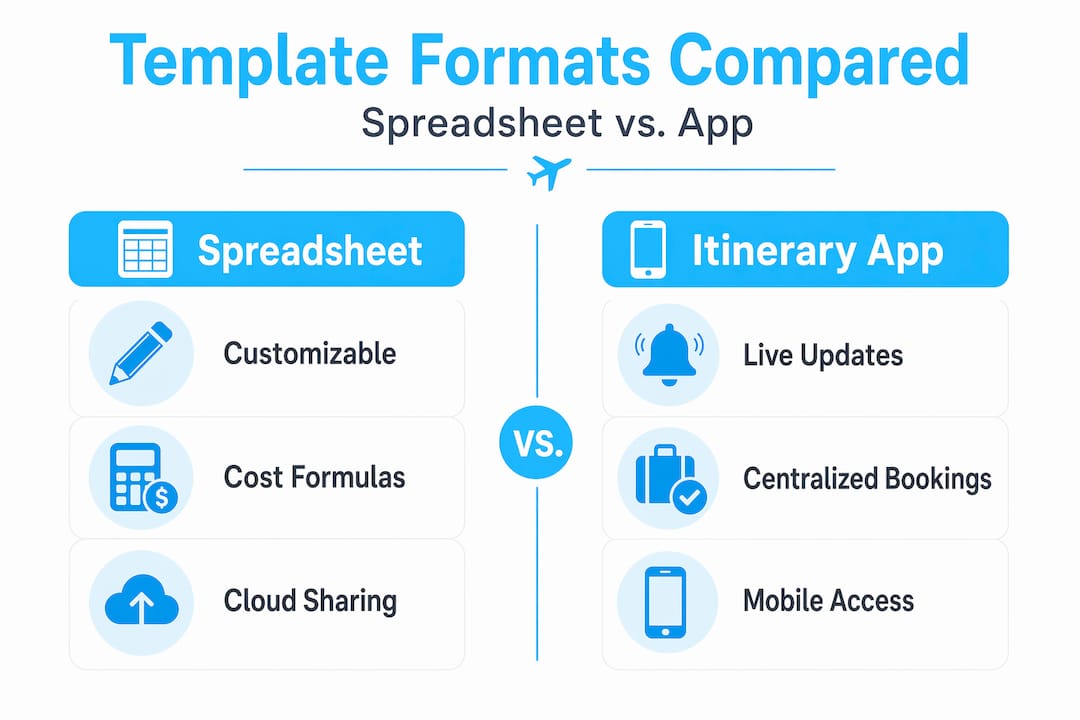
App-based travel itinerary planners like TripIt or similar tools give you real-time flight updates and centralized booking info in one place. The trade-off is that most apps follow a fixed structure, so if your trip style does not fit their mold, you end up working around the app instead of with it.
AI-powered templates are the newest option. Tools like ChatGPT and Gemini can generate a full itinerary and packing list in minutes. That speed is genuinely useful when you are starting from zero. But treat the output as a first draft, not a final plan. You can read more about how these tools affect the broader booking process in Pilottraveldeals’ guide on AI in travel booking.
How to customize a template for your trip
A template that does not match your travel style will get abandoned by day two. Customization is not optional.
Here is a step-by-step approach to adapting any travel itinerary template:
- Set your trip length first. Count your days and build the correct number of day blocks before adding anything else. It sounds obvious, but many people fill in a template designed for five days when they are actually traveling for ten.
- Adjust block density to your energy level. Not every day needs three packed activity blocks. Long travel days, arrival days, or days with flights should have lighter afternoon and evening blocks. Short visits benefit from intentional prioritization, not cramming in everything possible.
- Add a backup plan column. For each major activity, note one alternative in case it is closed, sold out, or rained out. This takes five minutes to set up and saves real stress on the ground.
- Customize budget categories to your habits. If you spend heavily on food experiences and very little on traditional sightseeing, shift those percentages. Your template should reflect how you actually travel, not an average traveler.
- Use the notes section for pre-trip tasks. Things like applying for a visa, reserving a restaurant three weeks out, or checking baggage allowances all go in the notes section with a due date. Your template becomes a light project management tool, not just a schedule.
Pro Tip: If you use AI to help generate your itinerary, treat every suggested attraction, opening hour, and price as unconfirmed. AI tools still miss essential details and require human review before you commit to a schedule.
For deeper guidance on keeping costs in check once your template is built, the Pilottraveldeals budget travel guide covers proven strategies that map directly onto the budget categories above.
Using your template before and during travel
Having a template set up is not the same as using it well. Here is how to work through it from planning phase to the last day of your trip:
- Fill in the non-negotiables first. Enter your flight numbers, arrival and departure times, hotel addresses, and confirmation numbers before you add a single activity. These are the structural pieces that everything else attaches to.
- Add daily activities with timing. Once accommodations and transport are locked in, fill your day blocks. Give each activity an approximate start time and note how long it typically takes, including getting there.
- Set up your budget tracker. Enter your total budget, assign category limits using the percentage framework above, and start logging confirmed bookings with their exact costs. Update this every time you pay for something new.
- Prepare your mobile or print version. Decide in advance how you will access the template on the road. If you use Google Sheets, download an offline version before you leave. If you prefer paper, print the finalized version and keep it in a folder with your booking confirmations.
- Mark completed tasks as you go. Crossing off or color-coding completed items gives you a real-time view of what is done and what still needs attention. It also reduces the anxiety of feeling like something might fall through the cracks.
Pro Tip: Keep a running “changes” section at the bottom of your template for any bookings that shift, cancel, or get upgraded. Having that record means you are never searching through email threads to remember what changed.
Common mistakes and how to avoid them
Even a well-designed template can fail if you misuse it. These are the pitfalls worth knowing before they happen.
- Over-scheduling. Keeping transit time under 40 to 50 minutes per itinerary block is a useful ceiling. When you go past that, the day starts to feel like a commute.
- Skipping backup for digital templates. If your laptop is lost or your cloud file gets corrupted, you lose everything. Export a PDF copy of your template before you leave, and email it to yourself.
- Trusting AI output without verifying. AI planning tools improve efficiency when they complement your process. They cause real problems when you accept them without checking official sources for hours, prices, and reservation requirements.
- Ignoring rest blocks. Build in at least one unstructured afternoon per three or four days. Trips without breathing room feel exhausting, not exciting.
- Inconsistent color coding. If you decide that red means non-refundable and green means paid, use that system everywhere. Mixing it up defeats the purpose. Color coding booking statuses only works when it is applied consistently.
A good travel itinerary template should tell a story and set clear traveler expectations. When it does, it creates trust and better trip preparation from day one.
My honest take on travel planner templates
I will be upfront: I used to think templates were overkill. I figured I could keep everything in my head or in a rough notes app, and that a proper template was something tour operators used, not regular travelers. That thinking cost me a few genuinely frustrating trips.
The shift happened on a two-week trip where I built a proper spreadsheet-based travel itinerary planner for the first time. What surprised me was not the convenience. It was how much calmer I felt on arrival days. There was no scrambling to remember the hotel address, no guessing whether we had paid a deposit, no arguments about what we were doing the next morning. The template had already answered those questions.
What I have found works best is a hybrid approach. I use an AI tool to generate a rough itinerary and packing list, then I spend about 30 minutes reviewing everything against actual opening hours and reviews. AI integration in travel planning is genuinely useful, but I treat it the way I treat autocomplete: helpful, not final.

The other lesson from real trips is about pacing. I used to pack every block because I was afraid of wasting a day. Now I leave one afternoon slot intentionally empty on every third day. Those unplanned hours always turn into the best part of the trip.
If you have never used a trip planning template before, start with something simple. A basic Google Sheet with dates, accommodations, and three daily blocks is enough. You will customize it after one trip, and by trip three, it will feel like the only way to plan.
— Asher
Plan smarter, travel further with Pilottraveldeals
Once your travel planner template is built and your days are mapped out, the next step is locking in the bookings that make it real. That is where Pilottraveldeals comes in. The platform compares deals across dozens of providers, so the accommodation and airfare lines in your budget tracker reflect actual low prices and not inflated rack rates. Find hotel deals that fit squarely inside that 30% accommodation budget you set, and use Pilottraveldeals’ cheap airfare tips to lock in transport costs before anything else shifts. Staying connected on the road is part of the plan too. Check out the SIM card options on Pilottraveldeals to budget that line item before you leave, not at the airport.
FAQ
What should a travel planner template include?
A solid travel planner template should include travel dates with days of the week, daily activity blocks covering morning, afternoon, and evening, transportation and accommodation details, a budget tracker with category breakdowns, and booking status indicators. These elements keep every aspect of a trip visible in one document.
What is the best format for an easy travel itinerary template?
Google Sheets works well for most travelers because it supports cost formulas and easy sharing, while printable PDF templates suit those who prefer an offline travel organization sheet. The best format is the one you will actually open and update throughout the planning process.
How do I create a travel planner from scratch?
Start by entering your fixed logistics: flight numbers, hotel addresses, and confirmation codes. Then add your day blocks with activities and approximate timings, set up a budget tracker using percentage-based categories, and add a notes section for pre-trip tasks and contingencies. You can find a walkthrough of this process in Pilottraveldeals’ guide on building a travel itinerary.
Can AI tools replace a manual travel planner template?
No. AI tools can generate a useful first draft of an itinerary and packing list quickly, but they require manual review. Real-world testing shows that AI-generated packing lists miss items, and suggested hours or prices may be outdated. Use AI as a starting point, then verify every critical detail.
How many activities should I plan per day?
Most travelers do best with two to three activity blocks per day, keeping each transit segment under 40 to 50 minutes. Building in one unscheduled slot every few days prevents fatigue and leaves room for the unexpected discoveries that often become the highlight of any trip.
Recommended
- 7 Best Practices for Efficient Business Trip Planning – PilotTravelDeals.com
- Travel itineraries for every budget: real examples & tips – PilotTravelDeals.com
- Understanding the Travel Planning Process: A Comprehensive Guide – PilotTravelDeals.com
- How to Plan Group Travel Easily and Save Money – PilotTravelDeals.com

