TL;DR:
- Google Flights helps budget travelers find affordable destinations using the Explore map, which shows fare bubbles across a world map. It also offers tools like the Date Grid and Price Graph to identify the cheapest travel dates and fare trends, saving money by shifting trip schedules. Using filters, multi-airport searches, and price tracking alerts enhances savings and helps travelers make smarter booking decisions.
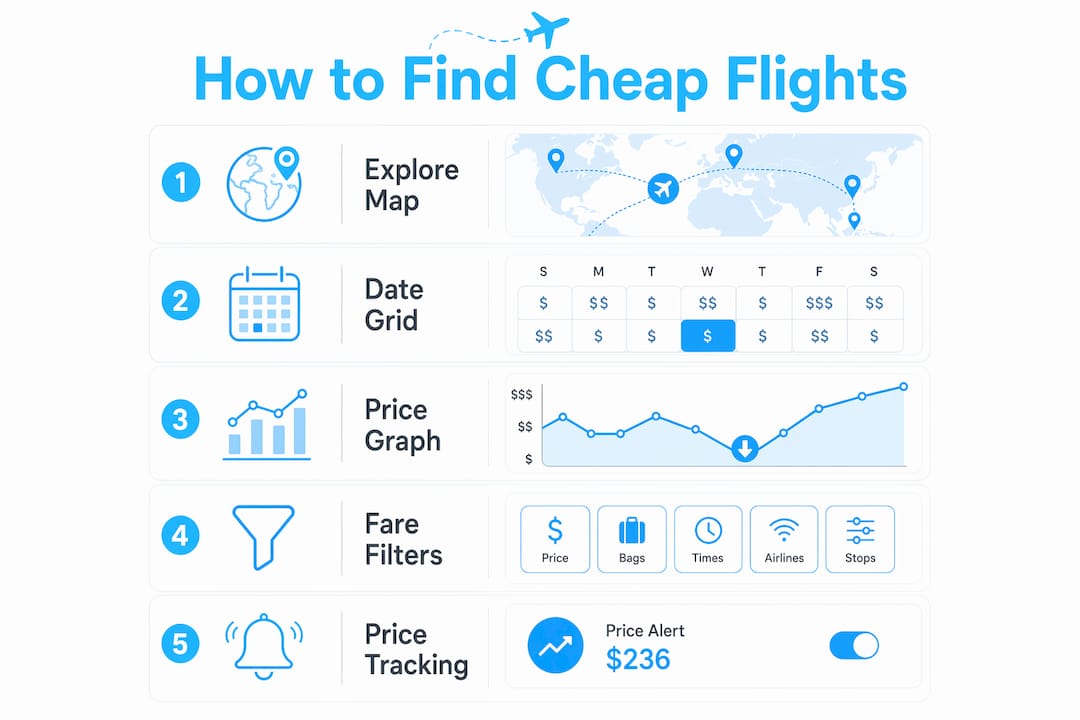
Google Flights is a free flight search engine that lets budget travelers compare fares, track price changes, and discover destinations based on what they can actually afford. Knowing how to find cheap flights on Google means using specific tools built into the platform: the Explore map, the Date Grid, the Price Graph, and price tracking alerts. Each one targets a different part of the booking problem. Together, they give you real control over what you pay. This guide covers every major feature, with concrete tips to help you book smarter and spend less.
How does the Google Flights Explore map help find cheap destinations?
The Explore map changes trip planning from “where do I want to go” to “where can I afford to fly,” making it the single most useful starting point for budget travelers. Instead of typing in a destination and hoping the price works, you open a world map covered in fare bubbles. Each bubble shows the cheapest available round-trip price from your home airport to that city.
To access it, go to Google Flights and leave the destination field blank. Hit search, and the map loads automatically. From there, you can filter by price range, trip length, airline, and travel dates. The map updates in real time as you adjust filters, so you can set a maximum budget and watch the map highlight only the destinations you can actually reach.
The practical value here is significant. A traveler based in Chicago might discover that flights to Lisbon are running $380 round-trip while New York is showing $520. Without the map, that traveler would never have thought to check Lisbon first. Budget-based destination discovery is the core skill that separates travelers who consistently find deals from those who overpay.
- Open Google Flights and leave the destination blank to trigger the Explore map.
- Set your departure airport, then apply a price cap using the filter slider.
- Toggle between “Anywhere” and specific regions to narrow or widen your options.
- Use the trip length filter to match your available vacation days.
- Check back weekly, since prices on the map shift frequently as airlines adjust inventory.
Pro Tip: Bookmark the Explore map with your home airport pre-filled. Checking it for five minutes once a week costs nothing and regularly surfaces deals you would never find by searching fixed destinations.
What are the Date Grid and Price Graph, and how do they find the cheapest dates?
The Date Grid and Price Graph are the two most underused tools in Google Flights, and they directly answer the question of when to fly. The Date Grid shows a calendar matrix of combined departure and return date prices. Each cell displays the total round-trip fare for that specific date combination, color-coded from cheapest to most expensive.
Shifting travel dates by one or two days can generate savings between $50 and $200 per ticket. That is not a small difference. On a family trip with four tickets, a two-day shift in your departure date could save $800 total. The Date Grid makes that comparison instant and visual, so you do not have to search each date manually.
The Price Graph works differently. It shows fare trends across an entire month or several months on a bar chart. Each bar represents the cheapest available fare on that day. You can spot patterns quickly: fares tend to spike around holidays and drop in the weeks before and after. Midweek departures on Tuesday through Thursday save an average of 14% on domestic airfare, which translates to roughly $42 per ticket. The Price Graph makes that pattern visible at a glance.
Google also labels fares as “low,” “typical,” or “high” based on historical pricing data. Over one-third of summer travelers book late, but these fare indicators help you decide whether to buy now or wait for a better price. A “low” label means the fare is below the historical average for that route. A “high” label is a clear signal to wait or adjust your dates.
| Tool | What it shows | Best use |
|---|---|---|
| Date Grid | Round-trip prices for every date combination | Finding the cheapest departure and return pair |
| Price Graph | Fare trends across weeks or months | Spotting low-price windows before committing to dates |
| Fare labels | Low, typical, or high vs. historical average | Deciding whether to book now or wait |
Pro Tip: Always open the Date Grid before you commit to any travel dates. Spending three minutes comparing adjacent dates can save more money than any discount code.
How to use fare filters, airport combos, and fare classes on Google Flights
Advanced filtering on Google Flights is where budget travelers separate real deals from misleading ones. The most important filter to activate is “Exclude basic economy.” Excluding basic economy fares prevents the frustration of booking a cheap ticket only to discover you cannot pick a seat, bring a carry-on, or make any changes. The filter removes those fares from results entirely, so every price you see reflects a usable ticket.

Baggage fee filters matter just as much. Some budget airlines charge $60 or more for carry-ons on a round-trip, which can turn a “cheap” $150 fare into a $210 fare once you add your bag. Applying the baggage cost filter forces Google Flights to show you the true all-in price, not just the base fare. That single adjustment changes how you rank results.
Multi-airport search is one of the most powerful and least-known features. Google Flights supports up to seven airports each way, and searching multiple departure and arrival airports simultaneously can reveal price gaps that sometimes exceed $200. If you live between two airports, always search both. If your destination city has a secondary airport, add it to the arrival field.
- Activate “Exclude basic economy” to filter out ultra-restrictive fares.
- Turn on baggage fee display to see real total costs before clicking through.
- Add nearby departure airports to your search to capture regional price differences.
- Add secondary arrival airports near your destination for additional savings.
- Filter by number of stops, layover duration, and departure time to match your preferences without sacrificing price visibility.
The multi-city search feature also lets you bundle different flight legs into one itinerary, which often costs less than booking two separate round-trips. If your trip involves more than one destination, this approach is worth testing before you book anything.
What are the benefits of Google Flights price tracking for budget travelers?
Price tracking on Google Flights is the closest thing to a set-it-and-forget-it savings tool available to budget travelers. The “Track prices” feature sends free email alerts directly to your inbox whenever fares change significantly for a route or specific flight you are watching. You need a Google account to activate it, but setup takes about ten seconds.
Here is how to use it effectively:
- Search your route on Google Flights and select your preferred dates.
- Toggle the “Track prices” switch near the top of the results page.
- Google will email you when the fare rises or drops on that route.
- Check the email, return to Google Flights, and rebook if the price has dropped.
- If you already have a ticket, compare the new fare against your refund policy before canceling.
The refundable ticket strategy takes this one step further. Booking a fully refundable ticket first, then rebooking at a lower price if fares drop, lets you lock in your travel dates while staying open to savings. The key is reading the refund policy carefully before booking. Not every “refundable” fare returns cash. Some issue travel credits instead, which limits your flexibility.
Setting up price tracking combined with refundable ticket bookings effectively counters airline pricing algorithms by keeping you informed and ready to act. Airlines adjust fares constantly based on demand, seat inventory, and competitor pricing. Price alerts put you on the same information level as the algorithm.
Pro Tip: Track multiple date windows for the same route, not just your ideal dates. Alerts for adjacent weeks often reveal a fare drop that makes a slight schedule adjustment worth it.
For a broader set of cheap flight booking strategies that go beyond Google Flights, Pilottraveldeals covers the full picture, including how to combine flight savings with hotel and transport deals for maximum total trip value.
Key Takeaways
Google Flights delivers the most savings when you combine the Explore map, Date Grid, price tracking, and advanced filters rather than using any single feature alone.
| Point | Details |
|---|---|
| Start with the Explore map | Search without a fixed destination to find the cheapest places you can fly right now. |
| Use the Date Grid before booking | Shifting dates by one or two days can save $50–$200 per ticket. |
| Filter out basic economy | Excluding restrictive fares gives you an accurate picture of what you are actually buying. |
| Add baggage fees to results | Budget airlines can add $60 or more in bag fees that the base fare hides. |
| Enable price tracking | Free email alerts let you rebook at a lower price if fares drop after you search. |
Why I think most travelers use Google Flights wrong
Most budget travelers open Google Flights with a fixed destination and fixed dates already in mind. They search, see the price, and either book or walk away. That approach uses maybe 10% of what the tool actually offers.
The Explore map is where I always start, even when I think I know where I want to go. Checking it first has changed my destination more than once, and the savings justified the flexibility every time. Seeing a $280 round-trip to Porto when I was planning to pay $480 for Barcelona is not a minor detail. That is a $200 decision.
The Date Grid is the second habit most travelers skip. People treat their travel dates as fixed when they are often just assumed. Moving a trip by two days is a small inconvenience. Saving $150 per ticket is a real outcome. The math is obvious once you see it on the grid.
The filter issue bothers me most. Travelers see a $99 fare and get excited, then discover it is a basic economy ticket with no carry-on and a middle seat they cannot change. Using the “Exclude basic economy” filter and the baggage fee display takes 30 seconds and prevents that frustration entirely. The advanced fare filtering guide at Pilottraveldeals goes deeper on this if you want the full breakdown.
My honest advice: treat Google Flights as a research tool, not a booking engine. Use it to understand the price landscape, set alerts, and identify your best window. Then book when the data tells you to, not when anxiety tells you to.
— Asher
Pilottraveldeals has more ways to cut your travel costs
Finding a cheap flight is only one part of keeping a trip affordable. Once you have the airfare sorted, hotel costs, SIM cards, and ground transport can quietly eat through the savings you worked hard to find.

Pilottraveldeals aggregates deals across flights, hotels, SIM cards, and more, so you can compare options across providers in one place. The site’s step-by-step booking guides walk you through the full process, from finding the right fare to locking in accommodation at the lowest available rate. For travelers planning a weekend trip, the lodging deal strategies at Wild Foodz pair well with the flight tactics covered here. Pilottraveldeals is built for travelers who want every line item on their trip to cost less.
FAQ
What is the best Google Flights feature for budget travelers?
The Explore map is the most powerful feature for budget travelers because it lets you search by price rather than destination, surfacing the cheapest places you can fly right now.
How much can shifting travel dates save on Google Flights?
Shifting departure or return dates by one or two days can save between $50 and $200 per ticket, according to fare data from the Date Grid tool.
How does the Google Flights price tracking alert work?
The “Track prices” toggle sends free email alerts to your inbox when fares change on a route or specific flight you are watching. You need a Google account to activate it.
Should I exclude basic economy fares when searching Google Flights?
Yes. Excluding basic economy removes ultra-restrictive fares from results, so every price you see reflects a ticket with standard seat selection and baggage policies.
What is the refundable ticket strategy on Google Flights?
Book a fully refundable fare first, then enable price tracking. If the fare drops, rebook at the lower price and cancel the original ticket. Always confirm the refund policy returns cash, not just travel credit.