TL;DR:
- A flight itinerary is a structured travel plan, not a booking confirmation, essential for visa applications and trip organization. It must include detailed segments such as passenger name, flight numbers, airports with IATA codes, dates, times, and ground arrangements to ensure clarity and compliance. Creating a comprehensive itinerary beforehand helps travelers make informed decisions, avoid delays, and streamline their journey planning process.
A flight itinerary is not the same as your booking confirmation, and that mix-up costs travelers real time and stress. A solid flight itinerary sample shows you exactly how to organize your complete travel plan, from departure gates to layover details, in one clear document. Whether you need it for budgeting a vacation, scheduling a multi-city business trip, or supporting a visa application, the format and content matter more than most travelers realize. This guide walks you through real examples, templates, and the exact steps to build one that works.
Table of Contents
- Key takeaways
- What a good flight itinerary sample includes
- Sample flight itinerary formats for every trip type
- How to create your own flight itinerary
- Common mistakes that break flight itineraries
- My take: what flight itineraries actually do for you
- Plan smarter with Pilottraveldeals
- FAQ
Key takeaways
| Point | Details |
|---|---|
| Itinerary vs. confirmation | A flight itinerary is a structured travel plan, not a ticket or booking receipt. |
| Components matter | Include airline, flight number, airport codes, dates, times, and cabin class for every segment. |
| Visa-ready formatting | Consistent, formal layout with complete segment details satisfies visa officer requirements. |
| Buffer time prevents stress | Build 30 to 60 minutes of buffer around major connections and activities. |
| Templates save time | A pre-formatted flight itinerary template eliminates the need to hunt for scattered travel details. |
What a good flight itinerary sample includes
Before you can build or use a flight itinerary sample, you need to know what goes into one. Skipping even one field can cause confusion at check-in, or worse, a visa rejection.
Here are the core components every complete itinerary should contain:
- Passenger name exactly as it appears on the passport or ID
- Airline name and flight number for every segment (for example, Delta DL 402)
- Departure and arrival airports with IATA codes (LAX, JFK, CDG)
- Departure and arrival dates and times, including time zones for international trips
- Cabin class (economy, business, first)
- Booking reference or PNR number
- Baggage allowance per segment if it varies
- Terminal and gate information when available
- Layover or connection details including the connecting airport and minimum connection time
- Ground transport notes for airport transfers if relevant
Flight itinerary templates are pre-formatted with these sections to reduce travel detail searches. That matters in practice. When you are sprinting through Frankfurt Airport at 7 a.m., you do not want to dig through three different email threads to find your gate number.
For visa-specific itineraries, per-segment flight details including airline, flight number, airport codes, dates, duration, and cabin class are not optional. Visa reviewers expect formal, recognizable formats, and missing one field can trigger a follow-up request or outright denial.
Pro Tip: Always include the IATA airport code alongside the city name. “Paris” is ambiguous (CDG or ORY), but “Paris CDG” is not.
Sample flight itinerary formats for every trip type
Seeing a real example is worth a hundred explanations. Here are three formats you can model directly, each suited to a different travel scenario.
Single-trip itinerary example
This is the simplest format. One outbound and one return flight, clearly labeled.
Outbound
Passenger: Jane Doe
Flight: AA 100 | American Airlines
Route: New York JFK → London LHR
Date: March 15, 2026
Departure: 9:00 PM EST | Arrival: 9:30 AM GMT (March 16)
Cabin: Economy | Booking Ref: ABCD12
Baggage: 1 checked bag (23 kg)
Return
Flight: AA 101 | American Airlines
Route: London LHR → New York JFK
Date: March 25, 2026
Departure: 11:00 AM GMT | Arrival: 2:00 PM EST
Cabin: Economy | Booking Ref: ABCD12

Clean, readable, and scannable in under 10 seconds.
Multi-city itinerary format
Multi-city trips get complicated fast. A structured multi-city itinerary uses date-coded segments showing flights and accommodations across cities, with a clear final outbound flight closing the loop.
| Segment | Date | Route | Flight | Accommodation |
|---|---|---|---|---|
| Outbound | Apr 3, 2026 | LAX → ORD | UA 500 | Chicago Marriott |
| Connection | Apr 6, 2026 | ORD → JFK | DL 200 | NYC Hotel Edison |
| Final | Apr 10, 2026 | JFK → LAX | AA 300 | Home |
This format works well when you need to book multi-city trips and keep all segments organized visually.
Visa application itinerary format
A Schengen visa itinerary sample uses a day-by-day table layout. The columns typically include: Day and Date, City and Country, Accommodation, Main Plan, and Transport. Flight entries appear as their own rows, clearly labeled with flight numbers and airport codes. The layout is designed for quick scanning by officials, not for casual reading.
The key difference from a casual itinerary is formality. No abbreviations, no shorthand. Every segment is spelled out completely. The daily activities and flights are best handled as coordinated but distinct components for clarity, not merged into one narrative paragraph.
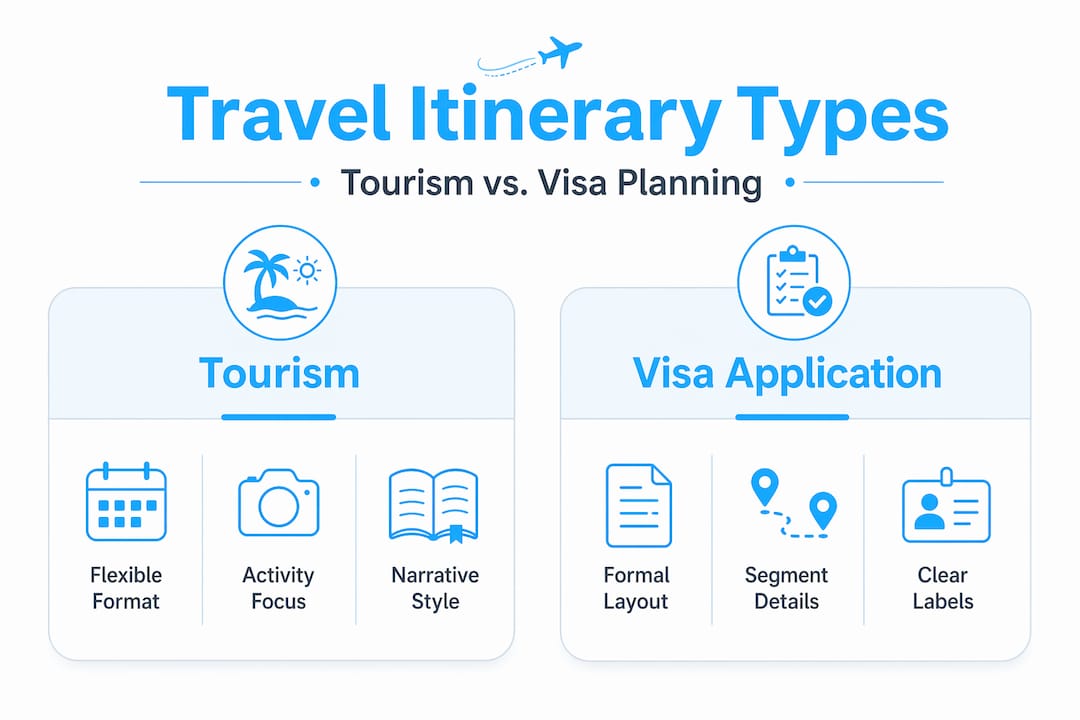
Tourism vs. business vs. visa: a quick comparison
| Purpose | Key Focus | Format Style |
|---|---|---|
| Tourism | Activities, hotels, sightseeing | Flexible, narrative-friendly |
| Business | Meeting schedules, transit efficiency | Precise times, minimal extras |
| Visa application | Proof of complete trip plan | Formal, table-based, no gaps |
How to create your own flight itinerary
Building a custom flight itinerary does not require special software. A spreadsheet or word processor handles it perfectly. What matters is the process.
- Gather every flight confirmation first. Pull all booking emails and note the key details for each segment: flight number, route, date, time, cabin class, and booking reference.
- Choose your format based on trip complexity. A single round-trip needs a simple two-block format. Multi-city trips benefit from a table. Visa applications demand formal, day-by-day layouts.
- Add accommodations alongside flight segments. Place travel dates and flight info prominently and consistently throughout the document, so you never have to hunt for them mid-trip.
- Build in buffer time. For connections, allow a minimum of 60 to 90 minutes at international airports. For daily activities, 30 to 60 minutes of buffer per major activity keeps the schedule realistic.
- Handle layovers explicitly. State the connecting airport, the minimum connection time, and the terminal change if applicable. “3-hour layover at Frankfurt FRA, Terminal 1 to Terminal 2 transfer required” is far more useful than just listing two flights back to back.
- Standardize your time format. Pick one and stick with it. 24-hour time eliminates AM and PM confusion across time zones.
- Use a template to lock in formatting. A flight itinerary template consolidates all flight and ground transport information into one document, which benefits both travelers and visa reviewers equally.
For honeymoon or leisure trips where pacing matters as much as logistics, check out this guide to budget trip planning for ideas on structuring relaxed but organized travel days.
Pro Tip: Limit yourself to 1 to 3 anchor activities per day. Over-scheduling is the single most common reason travelers find their itineraries useless by day two. Give yourself room to breathe.
Common mistakes that break flight itineraries
A flight itinerary that looks complete can still fail you or a visa officer if it has these problems baked in.
- Mixing booking confirmations with itinerary content. A booking email is raw data. An itinerary is a structured plan. Pasting one into the other creates a messy, hard-to-read document that serves neither purpose well.
- Missing segment details for connecting flights. Listing only the first and last flights while omitting the middle connection is one of the most common format errors in multi-city plans.
- Ignoring time zones. A flight departing Tokyo at 11:00 PM and arriving in Los Angeles at 6:00 AM the same calendar day is confusing without time zone labels. Always note the local time zone for both departure and arrival.
- Poor formatting that slows scanning. Consistency and continuity in visa-style itineraries prevent misinterpretation when officials scan documents quickly. Dense paragraphs, misaligned columns, and inconsistent date formats all create unnecessary friction.
- Overloading the document with unnecessary extras. Restaurant recommendations and shopping lists belong in a separate travel notes file, not inside the flight itinerary. Keep the itinerary focused on transport and accommodation logistics.
- Neglecting ground transport between airports and hotels. If your hotel is 45 minutes from the airport, that time needs to appear in your itinerary. Gaps in the timeline create confusion and, for visa purposes, raise red flags.
Pro Tip: Run a final check by asking one question: can someone unfamiliar with your trip read this document and understand exactly where you will be on every day of your travel? If not, fill the gaps.
My take: what flight itineraries actually do for you
I’ve watched plenty of travelers treat flight itineraries as a formality, something you produce when a consulate asks for it and ignore the rest of the time. That’s a mistake I made myself early on, and it cost me a missed connection in Amsterdam because I had no clear record of which terminal I needed.
In my experience, a well-built itinerary isn’t really about documentation. It’s about decision-making speed. When something goes wrong, and something always does on longer trips, the traveler who pulls out a clear, complete flight travel plan sample makes better decisions faster. They know the next flight option, the layover time they have left, and exactly which hotel they’re heading to.
What most travelers overlook is how much clarity the process of building the itinerary provides, even if they never look at it again. You catch scheduling conflicts, notice impractical connection times, and realize that four-country trip in eight days is actually not feasible.
My honest advice: build the itinerary before you finalize your bookings, not after. Use it as a planning tool. The sample flight schedule format keeps you honest about what the trip actually looks like on the ground.
— Asher
Plan smarter with Pilottraveldeals
Once your flight itinerary is mapped out, the next step is locking in the best deals to match it.

Pilottraveldeals makes it straightforward. Whether you’re building a tight budget trip or a multi-city tour, you can compare cheap airfare deals and find hotel options that align directly with your travel dates and city stops. The site aggregates offers from multiple providers, which means savings of up to 80% compared to booking direct. You can also pick up a travel SIM card so your itinerary is accessible and your navigation works the moment you land. Smart itinerary planning and smart deal-finding go together. Pilottraveldeals gives you both in one place.
FAQ
What is a flight itinerary sample?
A flight itinerary sample is a model document showing how to organize all flight segments, dates, times, routes, and travel details in a clear, structured format. It serves as a reference for building your own trip plan.
What should a flight itinerary include?
A complete flight itinerary should include passenger name, airline, flight number, departure and arrival airports with IATA codes, dates and times with time zones, cabin class, booking reference, and baggage allowance for each segment.
Is a flight itinerary the same as a boarding pass?
No. A boarding pass is issued at check-in for a specific flight. A flight itinerary is a pre-trip planning document that covers all segments of your journey and is often required for visa applications before you travel.
Do I need a flight itinerary for a visa application?
Yes, for most visa applications including Schengen visas. Visa reviewers expect a formal, complete flight itinerary showing every segment with full details. Informal or incomplete documents are a common reason for delays.
Can I use a template to make my flight itinerary?
Yes, and it is the most efficient method. A pre-formatted flight itinerary template ensures you do not miss required fields and keeps the document consistently structured for both personal use and official submissions.
Recommended
- Essential Tips for Finding Cheap Flights Effortlessly – PilotTravelDeals.com
- What is a travel itinerary? Smart trip planning guide – PilotTravelDeals.com
- How to Book International Flights: A Step-by-Step Guide – PilotTravelDeals.com
- Travel itineraries for every budget: real examples & tips – PilotTravelDeals.com